wob
wob - Wake On Bluetooth


This should fix my mainboard, where WOL does not work. It should be fixed with a esp32c3 to wake from S3 (Suspend) when it receives a BLE signal.
Motivation
My EVGA Z170 classified 4-way mainboard has TWO GbE ports: Intel i210 and i219. The latter even has a specific setting in the BIOS to activate WOL. Both are powered in S5 (Sleep) and recieve traffic, as indicated by their LEDs on the back. But their signal is never picked up by the mainboard, since the hardware and softwware implementation is focused on maximum overclocking, and not running a server. The magic packed arrives, and the mainboard just ignores it and keeps sleeping 😳. Let’s fix this!
Limitations
I tried this project with a Raspbery Pico W and WLAN. Unfortunately the idle power consumption of this solution is too high. As soon as the penta server enters S3 the Pico looses power. So I need a solution that requires less power. BLE is part of the solution, and a Supermini is just $2 and serves the purpose.
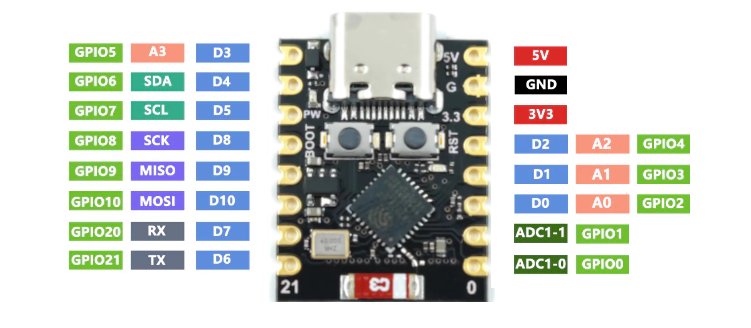
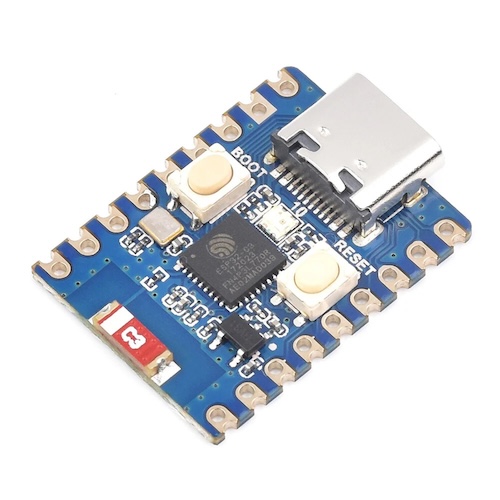
Recommendation:
- Visual Studio Code with ESP-IDF
- Arduino IDE
- NeoVIM and CLI
Code C
And here is a code example for the esp32c3.
#include <stdio.h>
#include "esp_log.h"
#include "nvs_flash.h"
#include "esp_pm.h"

// Bluetooth Includes
#include "nimble/nimble_port.h"
#include "nimble/nimble_port_freertos.h"
#include "host/ble_hs.h"
#include "services/gap/ble_svc_gap.h"
#include "services/gatt/ble_svc_gatt.h"

// USB Includes
#include "tinyusb.h"
#include "class/hid/hid_device.h"

static const char *TAG = "PentaWake";
uint16_t wake_handle;

// --- USB HID Configuration ---
static uint8_t const desc_hid_report[] = {
    TUD_HID_REPORT_DESC_KEYBOARD(HID_REPORT_ID(1))
};

const tinyusb_config_t tusb_cfg = {
    .device_descriptor = NULL,
    .string_descriptor = NULL,
    .external_phy = false,
    .configuration_descriptor = NULL,
};

// --- BLE GATT Logic ---
static int ble_svc_wake_cb(uint16_t conn_handle, uint16_t attr_handle, struct ble_gatt_access_ctxt *ctxt, void *arg) {
    if (ctxt->op == BLE_GATT_ACCESS_OP_WRITE_CHR) {
        ESP_LOGI(TAG, "Wake signal received via BLE!");

        // 1. Send USB Remote Wakeup to PC
        if (tud_suspended()) {
            tud_remote_wakeup();
        }

        // 2. Send a dummy keystroke just in case the PC is awake but screen is off
        uint8_t keycode[6] = {HID_KEY_F15};
        tud_hid_keyboard_report(1, 0, keycode);
        vTaskDelay(pdMS_TO_TICKS(50));
        tud_hid_keyboard_report(1, 0, NULL); // Release key

        return 0;
    }
    return BLE_ATT_ERR_UNLIKELY;
}

static const struct ble_gatt_svc_def gatt_svcs[] = {
    {.type = BLE_GATT_SVC_TYPE_PRIMARY,
     .uuid = BLE_UUID128_DECLARE(0xDE, 0xAD, 0xBE, 0xEF, 0xBA, 0xBE, 0xCA, 0xFE, 0xDE, 0xAD, 0xBE, 0xEF, 0xBA, 0xBE, 0xCA, 0xFE),
     .characteristics = (struct ble_gatt_chr_def[]){
         {.uuid = BLE_UUID16_DECLARE(0xFF01),
          .access_cb = ble_svc_wake_cb,
          .flags = BLE_GATT_CHR_F_WRITE,
          .val_handle = &wake_handle},
         {0}}},
    {0}};

void ble_app_advertise(void) {
    struct ble_hs_adv_fields adv_fields = {0};
    adv_fields.flags = BLE_HS_ADV_F_DISC_GEN | BLE_HS_ADV_F_BREDR_UNSUP;
    adv_fields.name = (uint8_t *)"Power button Penta";
    adv_fields.name_len = strlen("Power button Penta");
    adv_fields.name_is_complete = 1;
    ble_gap_adv_set_fields(&adv_fields);

    struct ble_gap_adv_params adv_params = {0};
    adv_params.conn_mode = BLE_GAP_CONN_MODE_UND;
    adv_params.disc_mode = BLE_GAP_DISC_MODE_GEN;
    ble_gap_adv_start(BLE_HS_OWN_ADDR_PUBLIC, NULL, BLE_HS_FOREVER, &adv_params, NULL, NULL);
}

void ble_host_task(void *param) {
    nimble_port_run();
    nimble_port_freertos_deinit();
}

void app_main(void) {
    // 1. Initialize NVS (Required for BLE)
    esp_err_t ret = nvs_flash_init();
    if (ret == ESP_ERR_NVS_NO_FREE_PAGES || ret == ESP_ERR_NVS_NEW_VERSION_FOUND) {
        nvs_flash_erase();
        nvs_flash_init();
    }

    // 2. Initialize USB HID
    ESP_ERROR_CHECK(tinyusb_driver_install(&tusb_cfg));

    // 3. Initialize BLE
    nimble_port_init();
    ble_svc_gap_device_name_set("Power button Penta");
    ble_svc_gap_init();
    ble_svc_gatt_init();
    ble_gatts_count_cfg(gatt_svcs);
    ble_gatts_add_svcs(gatt_svcs);
    nimble_port_freertos_init(ble_host_task);
    ble_app_advertise();

    // 4. Power Management (Light Sleep)
    esp_pm_config_esp32c3_t pm_config = {
        .max_freq_mhz = 160,
        .min_freq_mhz = 10,
        .light_sleep_enable = true
    };
    ESP_ERROR_CHECK(esp_pm_configure(&pm_config));

    ESP_LOGI(TAG, "Penta-GPU Wake Controller Started.");
}
Vibe coding? Claude responded with more than 300 lines of code for 2 simple prompts!
Python script to wake from the Raspberry Pi 4
import asyncio
from bleak import BleakClient

address = "XX:XX:XX:XX:XX:XX" # Replace with ESP32-C3 MAC
CHAR_UUID = "0000ff01-0000-1000-8000-00805f9b34fb"

async def main():
    async with BleakClient(address) as client:
        await client.write_gatt_char(CHAR_UUID, b'\x01')
        print("Wake signal sent to Penta server.")

asyncio.run(main())