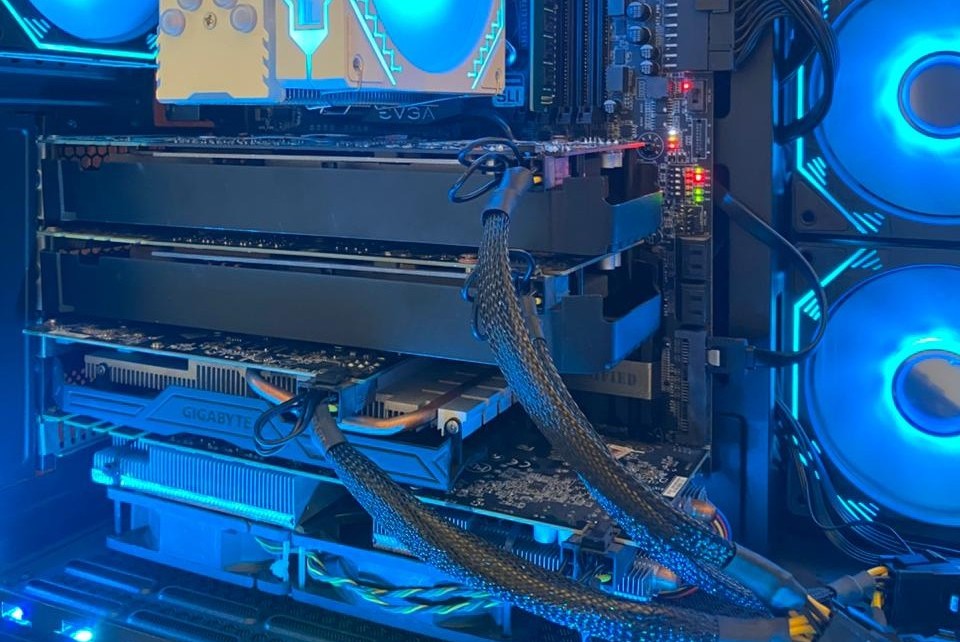
The goal for this server was to have a dedicated GPU machine with fast VRAM to increase the inference speed. See the History below. The planned P100 with HBM2 is not that much faster than my 3070 Ti. The multi GPU solution is more flexible and has ultimately more VRAM. Here is how it looks inside:
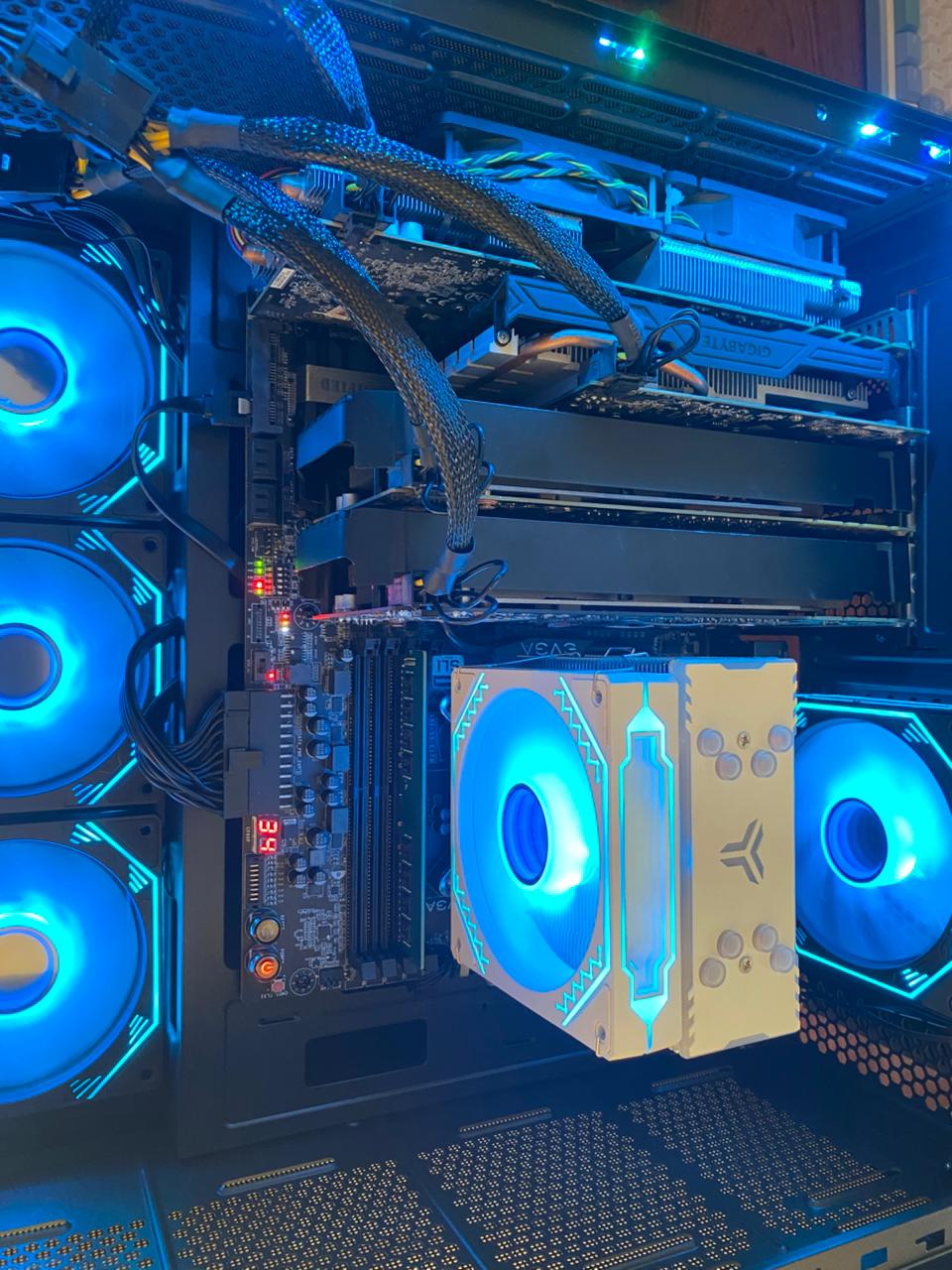 The graphic cards from left to right: P104-100, P106-100, GTX 1070 and P104-100. The LEDs on the mainboard indicate 3x green = PCIe Gen1 and 1x red = Gen3 for the 1070. CPU temperature currently at 34 degrees. For the boot process this display shows all kinds of other messages, states or errors.
A) Mainboard EVGA Z170 4-way classified - broken
I had seen the mainboard with 4 GPU slots a while ago for 600k, then reoffered at Chotot for 450k because one DIMM and one PCIe are broken. But everything else works, and a newer Z370 Gaming mainboard is 1,800k - significantly more expensive. This is just a hobby.
B) CPU i3-6100
Initially I had planned to use a i5-6600 4C/4T 3.9 GHz but the seller of the Z170 mainboard offered a i3-6100 CPU for 250k. The difference? 2C/4T 3.7 GHz, for my use case almost not noticeable, and another cost saving. One day I could upgrade to a 7600K or 7700K when the prices go down (I lost that confidence early 2026).
C) GPU cluster
Combining 4 GPUs with a combined VRAM of 30 GB makes it possible to run larger models like the nemotron-3-nano with 30 billion parameters on this machine. As a MoE model the token generation is still very usable with about 40 tokens/s.
 The cluster currently has these 4 Pascal CC 6.1 GPUs:
- 2x P104-100 with 320 GB/s bandwidth P104-100 for 650k + 400k
- GTX 1070 256 GB/s GTX 1070 8GB for 2K VND
- P106-100 with 192 GB/s P106-100 for 500k
Total cost: 3,550,000 VND or 136 USD or 115 Eur. Much cheaper than a DGX Spark for 4000 USD.
GTX 1070 8GB
After having a broken 1060 with 6GB and P106-100 with 6GB I was looking for more VRAM and visited some Chotot sellers for a 2080 Ti or 1080 Ti, only to find out that they had been sold. 11 GB sounded great! But I found a seller of the 1070 for only 2M VND, so I got one. At least I would be sure that the drivers would work, and I could use it for Gaming - just in case. Strangely, my much newer 3070 Ti also has only 8 GB of VRAM. Here is one benchmark result:
|----------------.------------------------------------------------------------|
| Device ID      | 1                                                          |
| Device Name    | NVIDIA GeForce GTX 1070                                    |
| Device Vendor  | NVIDIA Corporation                                         |
| Device Driver  | 535.288.01 (Linux)                                         |
| OpenCL Version | OpenCL C 3.0                                               |
| Compute Units  | 15 at 1683 MHz (1920 cores, 6.463 TFLOPs/s)                |
| Memory, Cache  | 8110 MB VRAM, 720 KB global / 48 KB local                  |
| Buffer Limits  | 2027 MB global, 64 KB constant                             |
|----------------'------------------------------------------------------------|
| Info: OpenCL C code successfully compiled.                                  |
| FP64  compute                                         0.223 TFLOPs/s (1/32) |
| FP32  compute                                         6.707 TFLOPs/s ( 1x ) |
| FP16  compute                                         0.112 TFLOPs/s (1/64) |
| INT64 compute                                         1.253  TIOPs/s (1/4 ) |
| INT32 compute                                         2.164  TIOPs/s (1/3 ) |
| INT16 compute                                         6.502  TIOPs/s ( 1x ) |
| INT8  compute                                        23.821  TIOPs/s ( 4x ) |
| Memory Bandwidth ( coalesced read      )                        210.08 GB/s |
| Memory Bandwidth ( coalesced      write)                        219.44 GB/s |
| Memory Bandwidth (misaligned read      )                        150.24 GB/s |
| Memory Bandwidth (misaligned      write)                         67.05 GB/s |
| PCIe   Bandwidth (send                 )                          3.90 GB/s |
| PCIe   Bandwidth (   receive           )                          3.55 GB/s |
| PCIe   Bandwidth (        bidirectional)            (Gen2 x16)    3.51 GB/s |
|-----------------------------------------------------------------------------|
P104-100
Got another one on 2026-02-14 and tested it’s speed - with GDDR5X even faster than the 1070.
|----------------.------------------------------------------------------------|
| Device ID      | 0                                                          |
| Device Name    | NVIDIA P104-100                                            |
| Device Vendor  | NVIDIA Corporation                                         |
| Device Driver  | 535.288.01 (Linux)                                         |
| OpenCL Version | OpenCL C 3.0                                               |
| Compute Units  | 15 at 1733 MHz (1920 cores, 6.655 TFLOPs/s)                |
| Memory, Cache  | 8116 MB VRAM, 720 KB global / 48 KB local                  |
| Buffer Limits  | 2029 MB global, 64 KB constant                             |
|----------------'------------------------------------------------------------|
| Info: OpenCL C code successfully compiled.                                  |
| FP64  compute                                         0.223 TFLOPs/s (1/32) |
| FP32  compute                                         6.657 TFLOPs/s ( 1x ) |
| FP16  compute                                         0.112 TFLOPs/s (1/64) |
| INT64 compute                                         1.434  TIOPs/s (1/4 ) |
| INT32 compute                                         2.238  TIOPs/s (1/3 ) |
| INT16 compute                                         6.660  TIOPs/s ( 1x ) |
| INT8  compute                                        24.369  TIOPs/s ( 4x ) |
| Memory Bandwidth ( coalesced read      )                        282.60 GB/s |
| Memory Bandwidth ( coalesced      write)                        314.01 GB/s |
| Memory Bandwidth (misaligned read      )                        170.19 GB/s |
| Memory Bandwidth (misaligned      write)                         69.88 GB/s |
| PCIe   Bandwidth (send                 )                          0.80 GB/s |
| PCIe   Bandwidth (   receive           )                          0.84 GB/s |
| PCIe   Bandwidth (        bidirectional)            (Gen1 x16)    0.82 GB/s |
|-----------------------------------------------------------------------------|
P106-100
I got this Crypto-GPU already in 2024/11/18 for 500k VND in my D7 neighborhood. It is now the slowest one in the cluster.
|----------------.------------------------------------------------------------|
| Device ID      | 2                                                          |
| Device Name    | NVIDIA P106-100                                            |
| Device Vendor  | NVIDIA Corporation                                         |
| Device Driver  | 535.288.01 (Linux)                                         |
| OpenCL Version | OpenCL C 3.0                                               |
| Compute Units  | 10 at 1708 MHz (1280 cores, 4.372 TFLOPs/s)                |
| Memory, Cache  | 6075 MB VRAM, 480 KB global / 48 KB local                  |
| Buffer Limits  | 1518 MB global, 64 KB constant                             |
|----------------'------------------------------------------------------------|
| Info: OpenCL C code successfully compiled.                                  |
| FP64  compute                                         0.151 TFLOPs/s (1/32) |
| FP32  compute                                         4.536 TFLOPs/s ( 1x ) |
| FP16  compute                                         0.076 TFLOPs/s (1/64) |
| INT64 compute                                         0.859  TIOPs/s (1/4 ) |
| INT32 compute                                         1.525  TIOPs/s (1/3 ) |
| INT16 compute                                         4.569  TIOPs/s ( 1x ) |
| INT8  compute                                        16.652  TIOPs/s ( 4x ) |
| Memory Bandwidth ( coalesced read      )                        166.56 GB/s |
| Memory Bandwidth ( coalesced      write)                        175.71 GB/s |
| Memory Bandwidth (misaligned read      )                        108.40 GB/s |
| Memory Bandwidth (misaligned      write)                         44.03 GB/s |
| PCIe   Bandwidth (send                 )                          1.66 GB/s |
| PCIe   Bandwidth (   receive           )                          1.67 GB/s |
| PCIe   Bandwidth (        bidirectional)            (Gen1 x16)    1.65 GB/s |
|-----------------------------------------------------------------------------|
GTX 1060 6GB broken
Only 2 DP output work, the HDMI and one DP are broken. I have some DP-HDMI adapter lying around, so for 1600k a 6GB graphics card makes sense. The similar P104-100 is only 650k, but has no graphics whatsoever. I got one later. This GPU was then exported to the E3-1226 v3 with GTX 1060 server.
D) Power consumption
Idle - 75 Watt
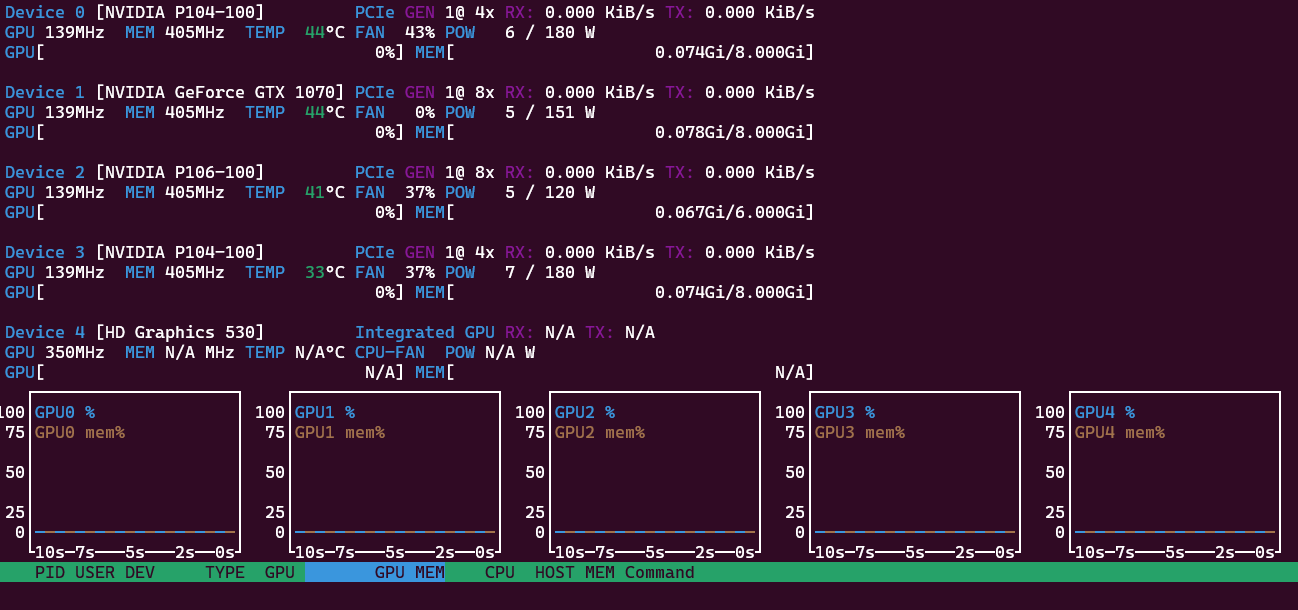
In idle the system needs 75 Watts. Using the internal GPU of the i3 instead of the 1070 reduced the power consumption by 10 Watt. With just 3 GPUs it was down to 60 W. That’s why the HD 530 shows up as fifth GPU and hence the name “Penta-GPU” instead of “Quadro’GPU” server. For LLMs we actually only use 4 GPUs, but want to reduce the power consumption. The PCIe bus reduces speed down to Gen1 to save energy, and the GPUs reduce frequency for their processor and memory. They report themselves to use 23 Watt combined:
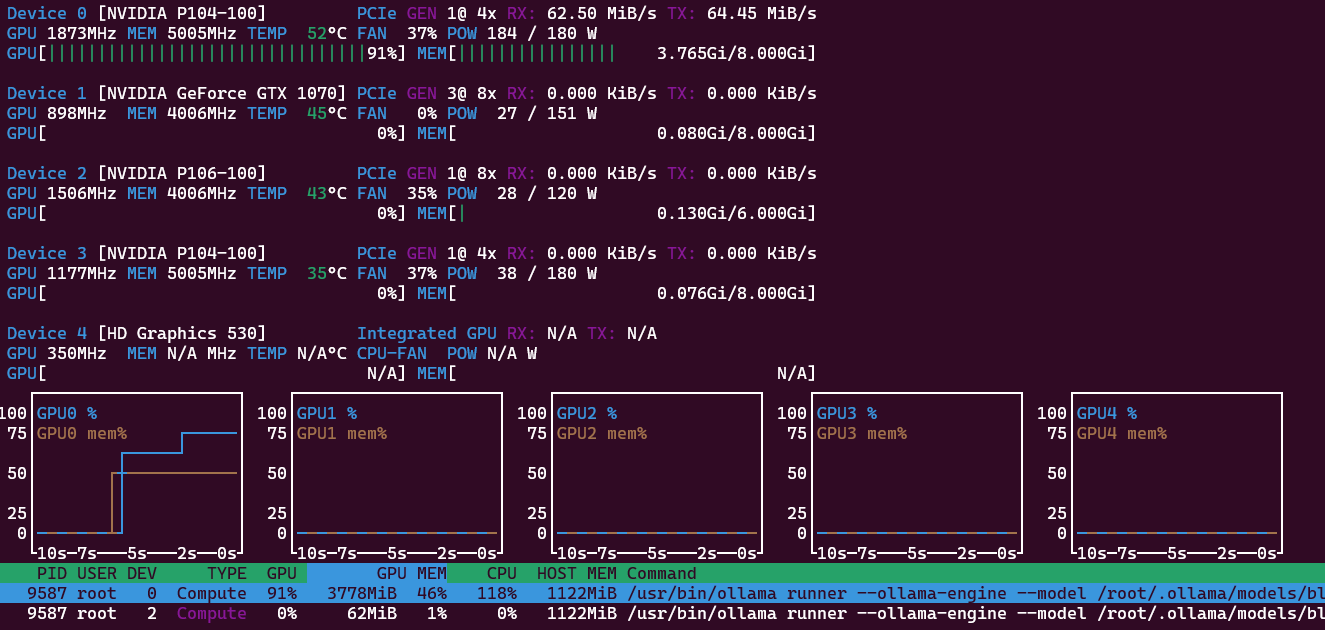
One GPU - 300 Watt
If I only run a smaller 4.3B parameter model like Gemma 3 in Ollama, only one GPU will be tasked and use 100% of the 180 W power budget. The combined consumption is about 300 Watt at the wall. Response 48 token/s and prompt 466 token/s. My example question was “Explain the French revolution in about 1000 words.” All 35 layers are offloaded to GPU0.
Four GPUs - 420 Watt
Larger models like nemotron-3-nano spread their 31.6B parameter and 26GB GPU memory footprint each GPU gets a part of the processing, but only about 60 Watt each. Again all model layers (53) are offloaded to the GPU. Combined the system now needs up to 420 Watt from the wall:
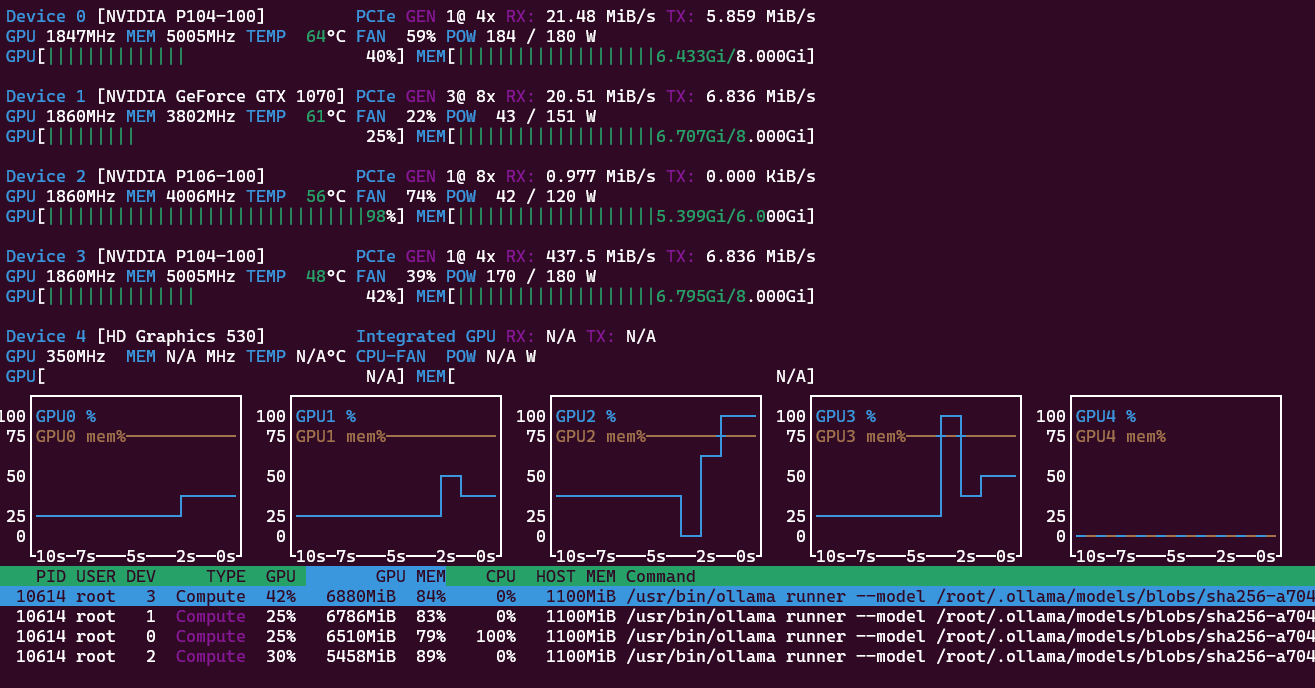
The response is 40 t/s and the prompt 120 t/s. Successive prompts are processed even faster with 435 and 438 t/s. For coding it easily produces a 200 lines python script to parse Markdown files in subfolders, remove YAML/TOML front matter, clean text, do word count, use Pandas, export as csv file. With 158 t/s for prompt and 40 t/s for response. Quite useful already! Now a coding agent with OpenClaw and a agentic coding model!
E) History
2025-01-10 Original Plans with P40 and P100
My planning was a possible multi-GPU machine with the P100 GPU as main ingredient. With just 16 GB it has less VRAM than the similar Tesla P40 but has significant higher memory bandwidth because of HBM2 instead of GDDR5. And after the compute heavy prompt processing is done (not very long before the answer starts) it is memory bandwidth that limits the token generation. There is still some MATMUL going on, but even a CPU is sitting idle waiting for some data to multiply to arrive.
| Specification | Tesla P40 | Tesla P100 |
|---|---|---|
| CUDA Cores | 3,840 cores | 3,584 cores |
| Memory Type | GDDR5 | HBM2 |
| Memory Capacity | 24 GB | 16 GB |
| Memory Speed | 1808 MHz | 1,430 MHz |
| Bandwidth | 346 GB/s | 720 GB/s |
| Memory Bus Width | 384-bit | 4096-bit |
| Max Power Consumption (TDP) | 250 W | 250 W |
The P100 is 267mm long and need some extra space for the fan (120mm for a 120 fan) that therefore does not fit into a HP ProDesk. This needs a dedicated build. As I will find out more than a year later 2026-02-18 P100 in the cloud the speed improvement would be not that significant. By then MoE models had sped up inference by almost one magnitude, so that again memory size would be a more limiting factor for useful local LLM models than just memory bandwidth.
2025-01-11 Case Xigmatek Cubi II (E-ATX)
The new big E-ATX mainboard needs a bigger case. And the case is intended for the larger P100. This GPU needs more space to fit a 12cm fan in front of the card. Evaluating some options I landed at the Xigmatek Cubi II and got it locally at tnc for 1,090k. https://www.tnc.com.vn/case-xigmatek-alpha-cubi-ii-black-en45271.html Eventually I never got the P100, so there is some empty space in the case next to the GPUs. At least for now.
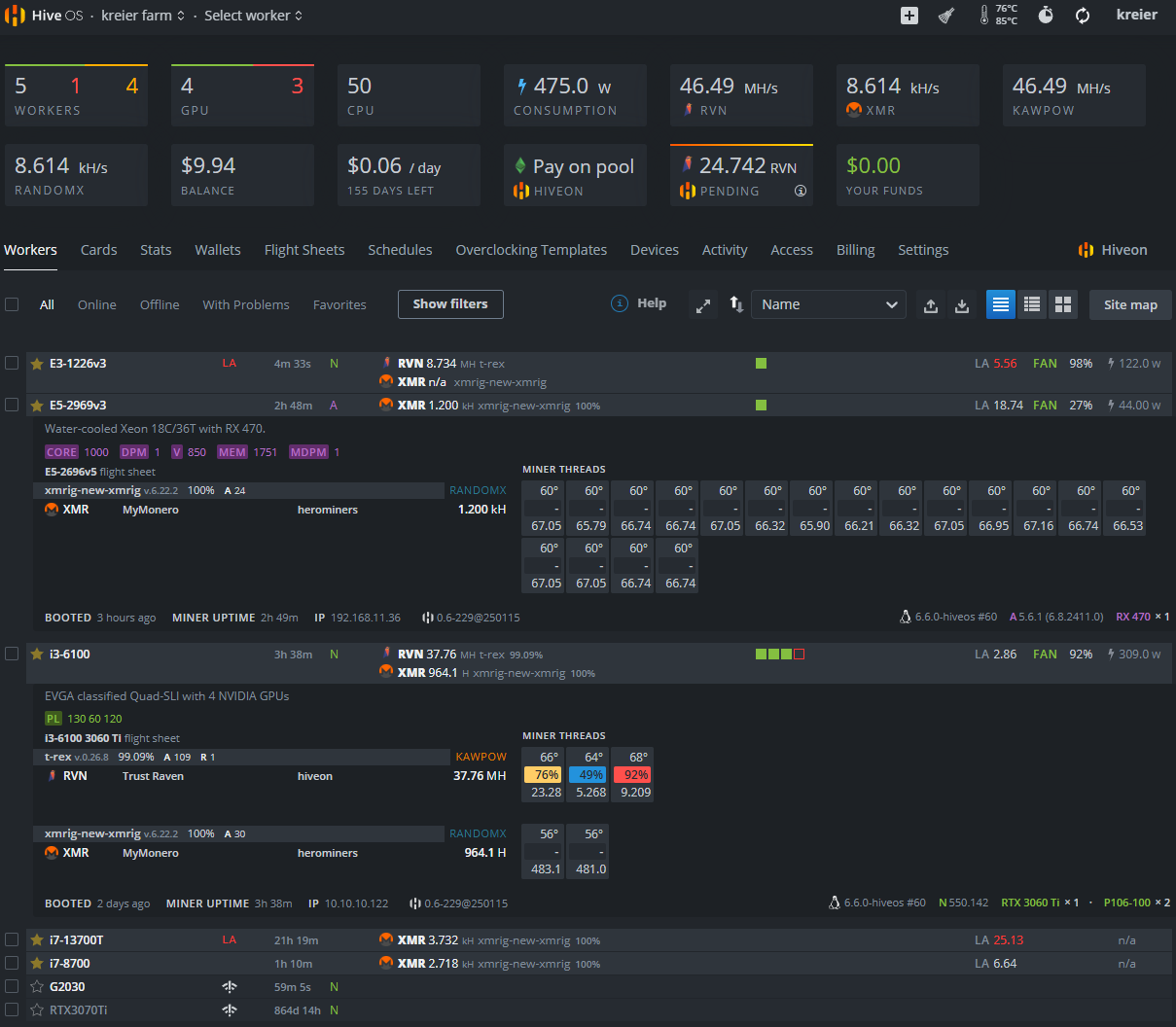
2025-01-27 Mining with three GPUs
The intention for the initially 3 GPUs was to be used for LLMs, but as a benchmark test I also run some mining. Far from being profitable it is a good way to see the whole system maxed out:
2026-02-18 P100 in the cloud
I noticed that I can use a P100 for free with my 7-year old Kaggle account from early 2019! Here is the link, below the result: https://www.kaggle.com/code/kreier/opencl-benchmark
.-----------------------------------------------------------------------------.
| Device ID    0 | Tesla P100-PCIE-16GB                                       |
|----------------'------------------------------------------------------------|
| Device ID      | 0                                                          |
| Device Name    | Tesla P100-PCIE-16GB                                       |
| Device Vendor  | NVIDIA Corporation                                         |
| Device Driver  | 580.105.08 (Linux)                                         |
| OpenCL Version | OpenCL C 3.0                                               |
| Compute Units  | 56 at 1328 MHz (3584 cores, 9.519 TFLOPs/s)                |
| Memory, Cache  | 16269 MB VRAM, 1344 KB global / 48 KB local                |
| Buffer Limits  | 4067 MB global, 64 KB constant                             |
|----------------'------------------------------------------------------------|
| Info: OpenCL C code successfully compiled.                                  |
| FP64  compute                                         3.521 TFLOPs/s (1/3 ) |
| FP32  compute                                         8.915 TFLOPs/s ( 1x ) |
| FP16  compute                                        16.576 TFLOPs/s ( 2x ) |
| INT64 compute                                         1.195  TIOPs/s (1/8 ) |
| INT32 compute                                         3.118  TIOPs/s (1/3 ) |
| INT16 compute                                         9.030  TIOPs/s ( 1x ) |
| INT8  compute                                         1.823  TIOPs/s (1/4 ) |
| Memory Bandwidth ( coalesced read      )                        543.07 GB/s |
| Memory Bandwidth ( coalesced      write)                        594.55 GB/s |
| Memory Bandwidth (misaligned read      )                        302.78 GB/s |
| Memory Bandwidth (misaligned      write)                         90.43 GB/s |
| PCIe   Bandwidth (send                 )                          4.73 GB/s |
| PCIe   Bandwidth (   receive           )                          5.19 GB/s |
| PCIe   Bandwidth (        bidirectional)            (Gen3 x16)    4.60 GB/s |
'-----------------------------------------------------------------------------'
The HBM2 of the P100 is not that much faster than the GDDR6X of my 3070 Ti. Theoretically it should reach 732 GB/s (for 5699 USD in 2016) while the 3070 Ti has 608 GB/s. In real application its rather 594 GB/s vs. 575 GB/s. Not 20% faster but only 3% faster with an older CC 6.1 versus 8.9. See the benchmark here: https://kreier.github.io/benchmark/gpu/
Some of my PCIe ports both on the Z170 mainboard as well as the special crypto cards have some limitations. If I use all 4 slots then some slots get reduced from 16 lanes to only 8. And the P104-100 has only 4 of the 16 lanes connected, while running only Gen1. With 0.84 GB/s we see the maximum of 1 GB/s approaching.
| Generation | x1 (1 Lane) | x4 (4 Lanes) | x8 (8 Lanes) | x16 (16 Lanes) |
|---|---|---|---|---|
| PCIe 1.0 | 0.25 GB/s | 1.0 GB/s | 2.0 GB/s | 4.0 GB/s |
| PCIe 2.0 | 0.50 GB/s | 2.0 GB/s | 4.0 GB/s | 8.0 GB/s |
| PCIe 3.0 | 0.985 GB/s | 3.94 GB/s | 7.88 GB/s | 15.75 GB/s |
| PCIe 4.0 | 1.969 GB/s | 7.88 GB/s | 15.75 GB/s | 31.51 GB/s |
Meanwhile the slower P106-100 has all 16 lanes at Gen1 speed. An updated test on 2026-02-19 delivered up to 3.33 GB/s - 4x the speed of the P104-100. The GTX 1070 reports x16 bus is slowed down to Gen3 x8 on the Z170 Classified mainboard. With a theoretical 7.88 GB/s we indeed measured 5.69 GB/s for this card.
2026-02-19 Finally four GPUs for LLMs
After getting another power splitter to supply four GPUs and carefully adding them to the system it finally worked: Four GPUs with 30 GB VRAM worked in unison. Now let’s get it some coding work to do!
Auto powering down
Ollama frees the GPU memory after not being used for 5 minutes (standard setting). I want to use this determine if the machine can go to suspension. I wanted to use sleep, but the Wake On Lan WOL of the Z170 board is implemented in a non-working way to target a maximum overclocking features. But S3 works, and a Raspberry Pico W rp2040 works as virtual keyboard to wake up the server over the network.
New project for powering down
It turns out, the Raspberry Pico W consumes too much power for Wifi. So when the penta goes to S3 suspension, there is not enough power for the Pico W to continue operating. We need less power! Maybe light sleep and BLE?
That’s the very idea of a new project with an esp32c3 Supermini, called https://github.com/kreier/wob for WOB - Wake On Bluetooth. It will take some time to make it run.
Inference speed on large 30B models
January 2025 - 0.92 to 6.37 t/s
In January 2025 I tried Qwen2.5:32b with 32.76B parameters and its 65 layers of 20 GB to fit into my 26 GB VRAM (8/6/6/6) machine. With 32 GB DDR4 I could run about 0.92 t/s from the CPU, limited by the memory bandwidth of about 32 GB/s. But I could not get the layers split and load into VRAM successfully. See ollama_multi_GPU.csv. With 3 GPUs (8/6/6) and 20 GB VRAM I could offload 80% to the GPU and got 21/14/15 layers there. The speed increased to 2.34 token/s. With a fourth GPU (8/6/6/6) I could get 98% of layers to the GPU: 19/15/15/15 and increased the inference to 5.11 token/s. Why not 100%? Just one more layer, you got already 21 into the 8GB GPU earlier! Well, I even commented on ollama Github about similar problems (#7509 of ollama and I think in the time since then it has been fixed.) With the parameter num_gpu=65 I got all layers offloaded, but also had an unstable system and 6.37 t/s.
January 2026 - 8.42 t/s
Retest in 2026 with 30 GB of VRAM (8/8/8/6) and the layers are easily offloaded 18/18/18/11 and the inference is up to 8.42 token/s. About 10x as fast as the CPU, with memory up to 320 GB/s on GDDR5X.
Newer MoE models - 38 t/s
A comparable model in size in 2026 is now available with nemotron-3-nano with 31.6B parameters, 53 layers and 24 GB model size. The context window is no longer just 32K but 1M! Now more MoE models are available, and the general speed has further increased for the same hardware, while the quality of the models also improved. Even though the memory footprint is 4GB larger the model is significantly faster! I get 38 t/s instead of just 8, almost 5x the speed because of MoE. And the answer is also much more sophisticated. Here a few more details of the comparison:
| model | size | parameter | context | token/s | prompt | GPUs | layers |
|---|---|---|---|---|---|---|---|
| qwen2.5:32b | 20GB | 32.8B | 32K | 8 | 75 | 4 | 65 |
| qwen3:32b | 20GB | 32.8B | 40K | 8 | 52 | 3 | 65 |
| gemma3:27b | 17GB | 27.4B | 128K | 9 | 50 | 3 | 63 |
| glm-4.7-flash:q4_K_M | 19GB | 29.9B | 198K | 25 | 81 | 3 | 48 |
| nemotron-3-nano:30b | 24GB | 31.6B | 1000K | 38 | 116 | 4 | 53 |
| gpt-oss:20b | 14GB | 20.9B | 128K | 42 | 238 | 2 | 25 |
| gemma3:4b | 4GB | 4.3B | 128K | 45 | 322 | 1 | 35 |
Surprisingly the largest model in this 30B class is also the fastest: nemotron-3-nano. With its MoE architecture it rivals much smaller 20B and 4B models! All that on 10 year old hardware!
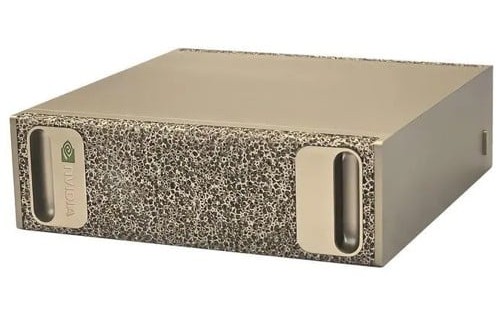
Comparison of Nemotron-3 speed
On February 7th, 2026, Alex Ziskind published a video of the NVIDIA DGX Spark for $4000 and it’s speed comparison to three similar products. In a later part he tested the very Nemotron-3-Nano-30B model (at 14:05) that I used, but in a non-quantized version (BF16 with 63.2 GB vs. Q4_K_M 24.6GB, 2.57x smaller).
- llama-bench pp4096 1068 t/s 14:48 (while I get 116 t/s, sometimes 450 t/s)
- llama-bench tg8196 throughput 61 token/s 12:49 (vs my 38 t/s just 60% faster)
- power 63 Watt, 200 Watt from the wall 15:26 (versus 420 Watt, 6.7x or 450W wall, 2.25x)
My prompt processing is 2-10x slower. But that’s just the initial start of generating the answer, usually just a few seconds. The very answer later is sometimes generated in several minutes. And here there is not much of a difference: 61 t/s vs. 38 t/s. Saved a few thousand dollars! The DGX Spark would be only 60% faster but with $136 for my 4 GPUs are 29x cheaper!




Qwen3-4B
Let’s test the smaller model Qwen3-4B:
- llama-bench pp4096 throughput 1970 t/s (12:37) is 3x faster
- llama-bench tg8192 throughput 61.8 t/s (12:49) is only 2.6x faster
- Power: 65 Watt GPU, 150 Watt from the wall (12:19) is in total 2x lower
The Qwen3:4B Q4_K_M is just 2.5GB and can run on a single P104-100 GPU. It only took a little longer to compile for the Pascal architecture, see GPU with CUDA Compiler 12.2 below.
- llama-bench pp4096 throughput 665 t/s
- llama-bench tg8192 throughput 23.5 t/s
- Power: 175 Watt GPU, 304 Watt from the wall
The instructions:
CUDA_VISIBLE_DEVICES=3 ./build/bin/llama-bench -m ~/.cache/llama.cpp/Qwen_Qwen3-4B-GGUF_Qwen3-4B-Q4_K_M.gguf -ngl 99 -p 4096 -n 8192Meaning of the parameters:
-ngl 99How many transformer layers are offloaded to the GPU. Number of GPU Layers, hardware utilization balance-pNumber of tokens in the _prompt_ (input context). Tests bulk throughput (how fast you can load context)-nNumber of tokens to generate after the prompt. Tests interactive speed (tokens/sec during generation)
To explore later: -n_batch 128 to see how much of a bottleneck the memory bandwidth is compared to the processing power.
F) Build llama.cpp for Pascal
This is not that easy. The latest stable Nvidia driver is from the 535 branch, currently 535.288.01. The CUDA compiler shipping with the 535 driver is 12.2, but this version does not support Ubuntu 24.04, only 20.04 and 22.04. Ubuntu 24.04 ships with gcc 13, but CUDA 12.2 only works with gcc 12. I was not able to get a working image with CUDA Compiler 12.9, the latest to support the Pascal architecture. Everything below CC 7.5 was dropped with version 13.
I went for the older CUDA Toolkit 12.2 with the driver 535.288.01 (supporting my 4 Pascal GPUs) in the 22.04 variant. In summary the prerequisites that worked:
- Ubuntu 24.04
- CUDA Toolkit 12.2 - you have to add the path variables by hand
- Nvidia driver 535.288.01
- GCC and CPP v12, not 13
Here the installation:
wget https://developer.download.nvidia.com/compute/cuda/12.2.0/local_installers/cuda_12.2.0_535.54.03_linux.run
sudo sh cuda_12.2.0_535.54.03_linux.run
git clone https://github.com/ggml-org/llama.cpp
cd llama.cpp
Just the CPU
rm -rf build
cmake -B build -DLLAMA_OPENSSL=ON -DBUILD_SHARED_LIBS=OFF
cmake --build build --config Release
./build/bin/llama-cli -hf Qwen/Qwen3-4B-GGUF:Q4_K_M -p "Explain quantum entanglement"
Result: It works! And Qwen3 is a reasoning model, so it takes a little time to answer. The result then is: pp 14.4 t/s and tg 4.9 t/s. Does the benchmark work with b8157?
./build/bin/llama-bench -m ~/.cache/llama.cpp/Qwen_Qwen3-4B-GGUF_Qwen3-4B-Q4_K_M.ggufResult: pp512 with 18.6 t/s and tg128 with 6.5 t/s. Now let’s try this with GPU:
GPU with CUDA Compiler 12.2
cmake -B build -DLLAMA_OPENSSL=ON -DBUILD_SHARED_LIBS=OFF -DGGML_CUDA=ON
cmake --build build --config Release
./build/bin/llama-cli -hf Qwen/Qwen3-4B-GGUF:Q4_K_M -p "Explain quantum entanglement" --n-gpu-layers 99
It worked! The work is distributed across all 4 GPUS. Now for benchmarking, with standard parameters I get pp512 813 t/s and tg128 40.3 t/s. Compared to CPU that’s 44x and 6.2x. If I limit to one GPU with UDA_VISIBLE_DEVICES=0 ./build/bin/llama-bench -m ~/.cache/llama.cpp/Qwen_Qwen3-4B-GGUF_Qwen3-4B-Q4_K_M.gguf -ngl 99 I get pp512 914 t/s and tg128 49 t/s. That’s 49x and 7.6x. Now to the benchmark to compare with the DGX Spark:
CUDA_VISIBLE_DEVICES=0 ./build/bin/llama-bench -m ~/.cache/llama.cpp/Qwen_Qwen3-4B-GGUF_Qwen3-4B-Q4_K_M.gguf -ngl 99 -p 4096 -n 8192The result:
| pp4096 | tg8192 | GPU | wall | |
|---|---|---|---|---|
| DGX | 1970 | 61.8 | 65 W | 150 W |
| GPU 4x | 698 | 21.54 | 240 W | 440 W |
| GPU 1x | 664 | 23.47 | 175 W | 304 W |
As mentioned above: 29x cheaper, using 2x the power and 2.5 to 3x slower. But with this token generation speed it is still usable.
Speed CPU vs GPU
Here I compare the small Qwen3-4B model on the i3-6100 CPU to the split across 4 GPUs and just running on the P104-100. For comparison I added the memory bandwidth, the main bottleneck.
| pp512 | tg128 | pp4096 | tg8192 | GB/s | |
|---|---|---|---|---|---|
| CPU i3-6100 | 19 | 6.5 | 14 | 4.9 | 32 |
| GPU 4x Pascal | 813 | 40.3 | 698 | 21.5 | ~250 |
| GPU P104-100 | 914 | 49.0 | 664 | 23.5 | 314 |
Not working with CUDA Compiler 12.9
I tried a freshly compiled llama.cpp b8134 with nvidia-smi 535.288.01 and nvcc 12.9. I thought it would be simple:
rm -rf build
cmake -B build -DGGML_CUDA=ON -DLLAMA_OPENSSL=ON -DCMAKE_BUILD_TYPE=Release -DCMAKE_CUDA_ARCHITECTURES=OFF -DCMAKE_CUDA_FLAGS="--generate-code=arch=compute_61,code=sm_61 -Wno-deprecated-gpu-targets"
cmake --build build --config Release
Testing
./build/bin/llama-cli -hf Qwen/Qwen3-4B-GGUF:Q4_K_M -p "Explain quantum entanglement" --n-gpu-layers 99No, it crashes. See above solution with 12.2