LLM Large Language models
Ollama
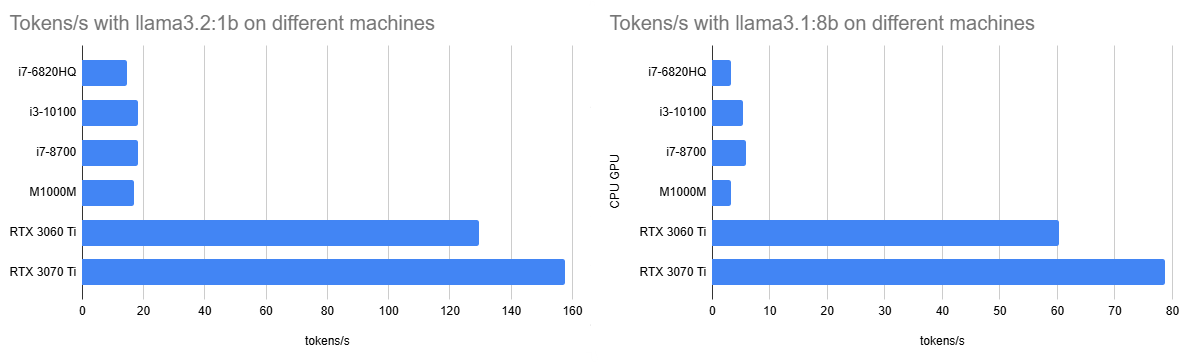
While the training is probably out of the scope of a hobbyist to get meaningful results running inference can be done with a CPU and just 2 GB of RAM dedicated to a small LLM. More RAM fit larger models and give more extensive results, but also need more computing power. A parallelized GPU on the other hand can speed up the generation process of a GPT (generative pre-trained transformer). So I tried different sizes on different sets of hardware.
The reference inference task after ollama run --verbose llama3.2:1b is explain quantum entanglement.
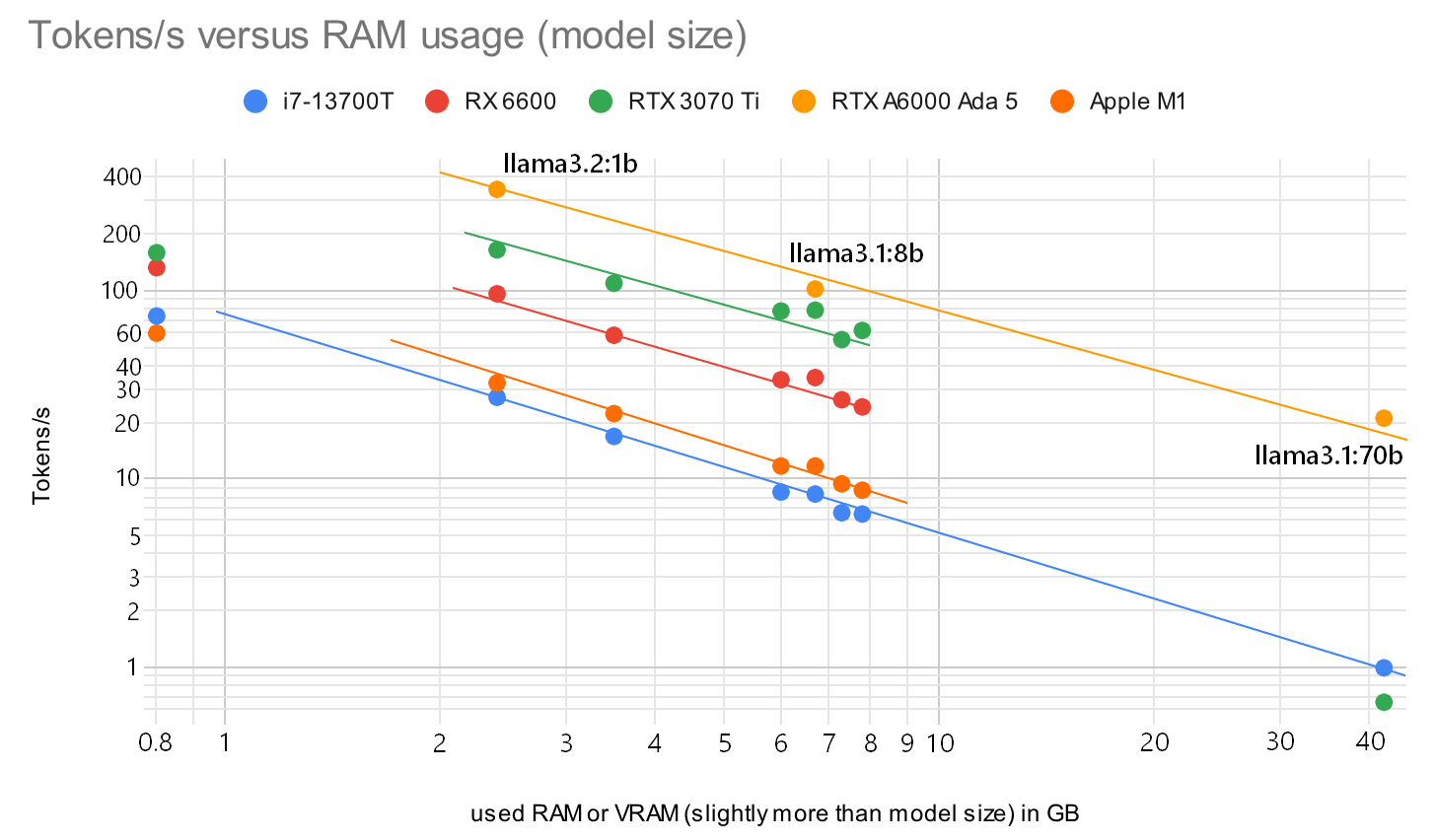
Interestingly the 1.3B model llama3.2:1b actually consumes 2.7 GB for the 100% GPU on my 3070 Ti, while the llama3.1:latest should only be 4.7 GB according to ollama list but actually requires 6.7 GB in ollama ps. What is the origin of this overhead?
To disable the use of the GPU when generating the answer I set /set parameter num_gpu 0. You see the results of tokens/s below.
| CPU GPU | qwen2.5:0.5b | llama3.2:1b | llama3.2:3b | llama3.1:8b | llama3.1:70b |
|---|---|---|---|---|---|
| E3-1226 v3 | 36.6 | 13.7 | 9.1 | 4.3 | - |
| i7-6820HQ | 41.6 | 16.7 | 10.2 | 4.7 | 0.57 |
| E5-2696 v3 | 43.9 | 17.6 | 10.5 | 4.8 | 0.18 |
| i3-10100 | 39.8 | 19.1 | 11.5 | 5.4 | 0.71 |
| i7-8700 | 54.1 | 20.1 | 12.1 | 5.9 | 0.64 |
| i7-13700T | 73.3 | 27.1 | 16.8 | 8.3 | 0.99 |
| Ryzen AI 9 HX 370 | 37.6 | ||||
| X Elite X1E78100 | 51.9 | ||||
| M1000M | 32.6 | 17.6 | 8.6 | 3.6 | - |
| GTX 960 | 68.9 | 18.6 | 10.2 | 4.15 | - |
| RX 6600 | 132.4 | 96.2 | 57.9 | 34.5 | - |
| RTX 4050 Laptop | 99.4 | ||||
| RTX 3060 Ti | 163.5 | 151.7 | 96.7 | 60.2 | 0.69 |
| RTX 3070 Ti | 159.1 | 164.6 | 109.4 | 78.7 | 0.65 |
| RTX A6000 Ada | 345.1 | 102.2 | 20.7 |
The correlation between model size (or a little more used RAM/VRAM) and the output speed tokens/s is visualized in this graph:
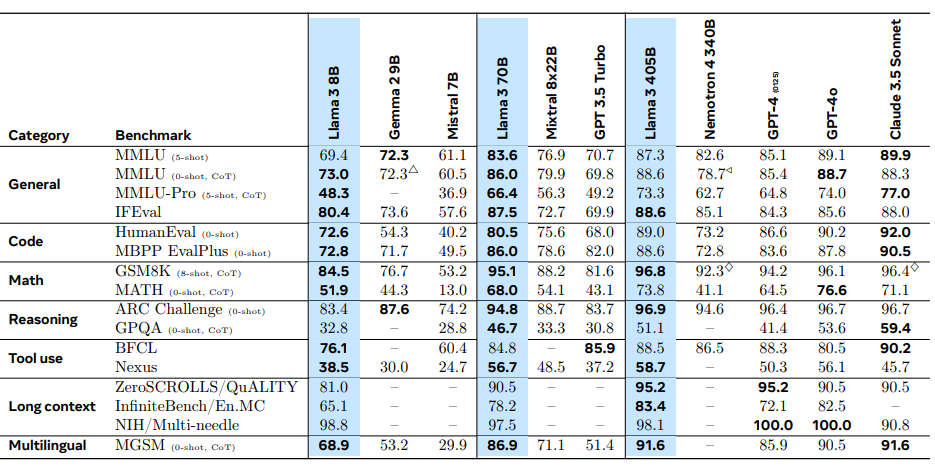
Of course larger models are more accurate. Meta measured this metric in serveral benchmarks as well:
With my hardware I try to fit my models in 8GB and probably will use 7b models. Or the new llama3.2vision:11b. I should have gone for the 12GB 3060!
Apple Silicon
Since 2023 I am thinking about getting a M1 Pro or M2 Max processor with a lot of RAM to run LLMs on these machines. Looks like I’m not the only one, see this conversation on llama.cpp by ggerganov. He also included a graph for PP (prompt processing) and TG (text generation). Let’s compare the values to my results for TG on the Nvidia GPUs on llama3.1:8b (probably comparable to LLaMa 7B):
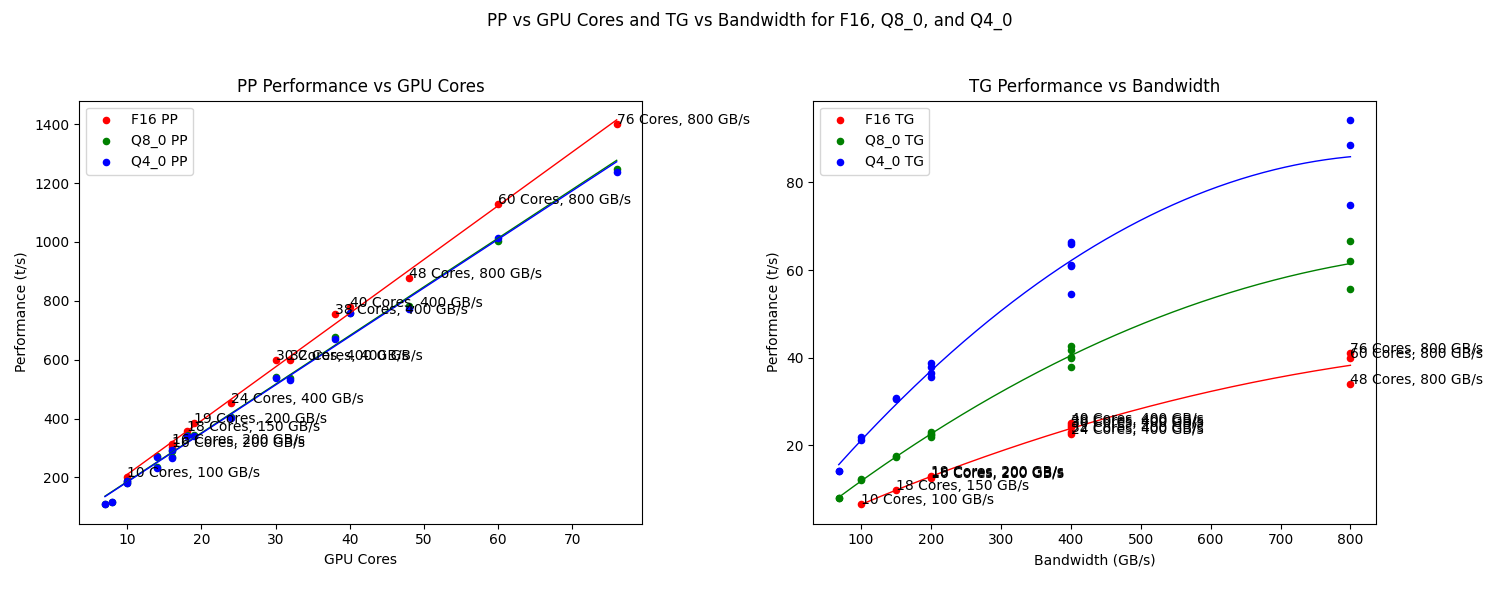
The M4 Pro with 275 MBs has already been updated, and it allignes with my estimate of 50 t/s for Q4_0 TG. That’s about the speed of my RTX 3060 Ti. Following the graph I created above I would reach 20 t/s for models of 20 GB size (40b in Q4_0) and probably only 9 t/s for a larger 70b Q4_0 model while utilizing 43 GB RAM. Not sure if this fit into a possible 48 GB option (+ $400) for the smallest M4 Pro 12/16. More RAM requires the largest M4 Max (+ $1100) but starts with 48GB RAM and goes up to 128 GB (+ $1000). And that’s still not large enough for a 405b model, even quantized to Q4_0 you can estimate some 200 GB.
Good that there is the cloud. Since you won’t run it 24/7. Go with smaller models to play at home!
How many PCIe lanes are connected 1 vs. 4
My P104-100 has only 4 PCIe 1.0 lanes connected. That’s a big difference to the 3.0 x16 for the similar GTX 1070/1080 (where the GDDR5X memory is from). Let’s see how this applies in real world applications.
Test case with Ollama and these two models:
- gemma3:4b (3.3 GB) https://ollama.com/library/gemma3:4b
- ministral-3:8b (6.0 GB) https://ollama.com/library/ministral-3
Results:
My test prompt is “Explain the French revolution with 1000 words.” and “What is quantum entanglement?”