CoreMark
The initial code was developed in 2009 by EEMBC. Since 2018 it is additionally licenced with the Apache licence. It allows to compare 8bit SBCs like an Arduino Mega 2560 with just 8 kB RAM and 16 MHz to an i7-13700T with 4.6 GHz or a Exynos 2400.
Single Core
For a quick test in Linux just enter the following commands:
git clone https://github.com/eembc/coremark
cd coremark
make
cat run1.log
Multi Core
To use all the available cores on a CPU like 13700T simply write
make clean
make XCFLAGS="-g -DMULTITHREAD=24 -DUSE_FORK=1"
cat run1.log
Results
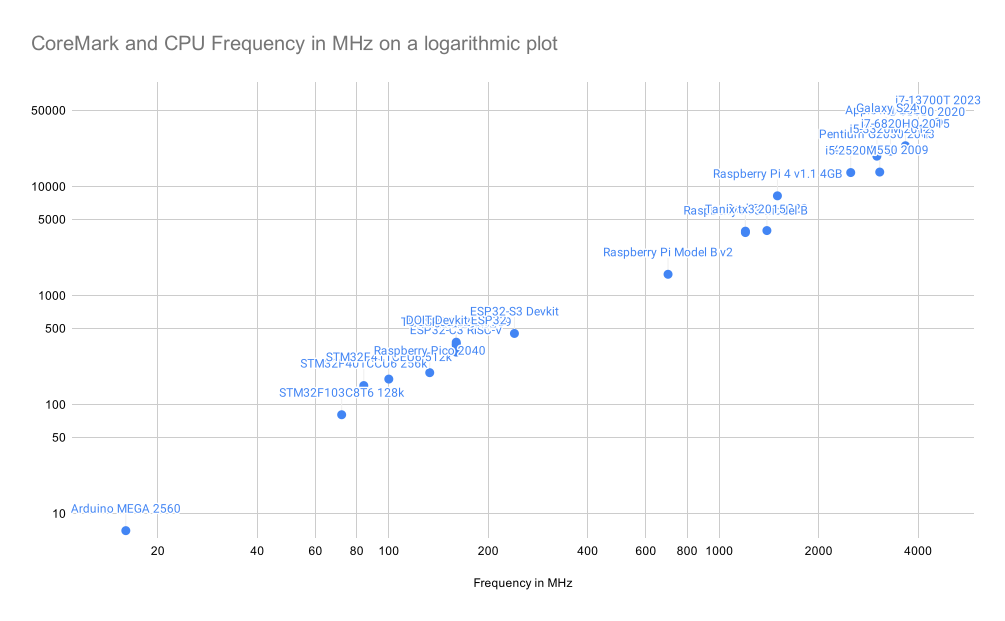
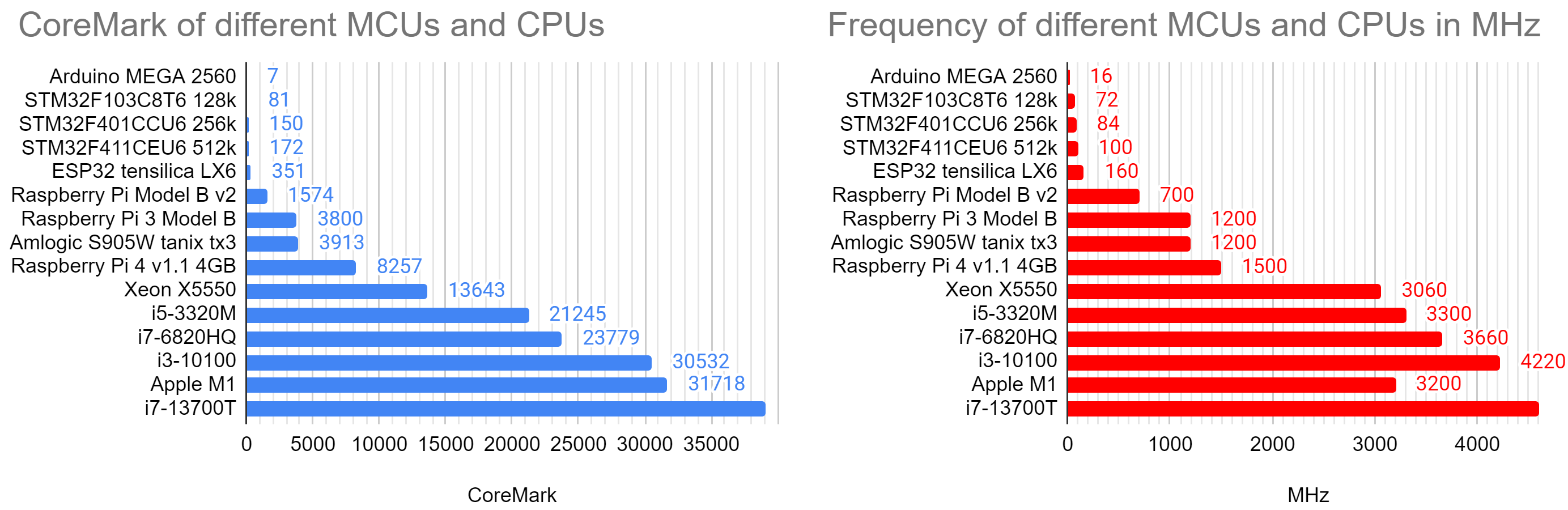
One can easily see how the score scales with the frequency over this wide range.
Port for Arduino 2019 and ESP32
In 2019 Paul Stoffregen from PJRC with the Teensy project ported it to Arduino. It runs out of the box on an ESP32. Multicore optimisation is not enabled yet. In ubuntu it works with
make XCFLAGS="-g -DMULTITHREAD=4 -DUSE_FORK=1"
Port for esp8266 2020 with ESP IDF crosscompiling toolchain
The Arduino port from Paul Stoffregen does not run on ESP8266 yet. But ochrin used the esp8266 toolchain and got some results in March 2020. I tried to replicate his results:
| Board | CoreMark | Ochrin |
|---|---|---|
| ESP8266 80 MHz | 155 | 191 |
| ESP8266 160 MHz | 262 | |
| ESP32 80 MHz | 166 | |
| ESP32 160 MHz | 332 | |
| ESP32 240 MHz | 498 | |
| ESP32 2C 160 MHz | 661 | |
| ESP32 2C 240 MHz | 991 |
Still no match for the 2314 coremark score of the Teensy 4.0 (Cortex-M7 at 600 MHz compared to LX6 with 240 MHz). I can’t make the ESP32 toolchain running.
Port for Raspberry Pico 2040 in 2021
Starting in February 2021 in the Raspberry Pi forum a port of CoreMark for the rp2040 was discussed and developed. The latest version v1.0.7 is from April 2024. It is in the repository https://github.com/protik09/CoreMark-RP2040.
Multi-Core is still on the ToDo list.
Results numbers
Some of my results from Arduino IDE and Ubuntu:
| Board | CoreMark | LED | MHz | Mark/MHz |
|---|---|---|---|---|
| Arduino MEGA 2560 | 7 | 13 | 16 | 0.44 |
| STM32F103C8T6 128k | 81 | 17 | 72 | 1.13 |
| STM32F401CCU6 256k | 150 | 31 | 84 | 1.79 |
| STM32F411CEU6 512k | 172 | 31 | 100 | 1.72 |
| T-Koala ESP32 | 351 | 5 | 160 | 2.19 |
| Raspberry Pi Model B v2 | 1574 | 700 | 2.25 | |
| Qualcomm Atheros QCA956X | 2053 | 775 | 2.65 | |
| Raspberry Pi 3 Model B | 3800 | 1200 | 3.17 | |
| Amlogic S905W tanix tx3 | 3913 | 1200 | 3.26 | |
| Raspberry Pi 4 v1.1 4GB | 8257 | 1500 | 5.50 | |
| Xeon X5550 | 13643 | 3060 | 4.46 | |
| i5-3320M | 21245 | 3300 | 6.44 | |
| i7-4960HQ | 21326 | 3800 | 5.61 | |
| i7-6820HQ | 23779 | 3660 | 6.61 | |
| i3-10100 | 30532 | 4220 | 7.23 | |
| i7-13700T | 39082 | 4600 | 8.49 | |
| Apple M1 | 31718 | 3200 | 9.91 | |
| Exynos 2400 in Galaxy S24 | 33129 | 3210 | 10.32 |
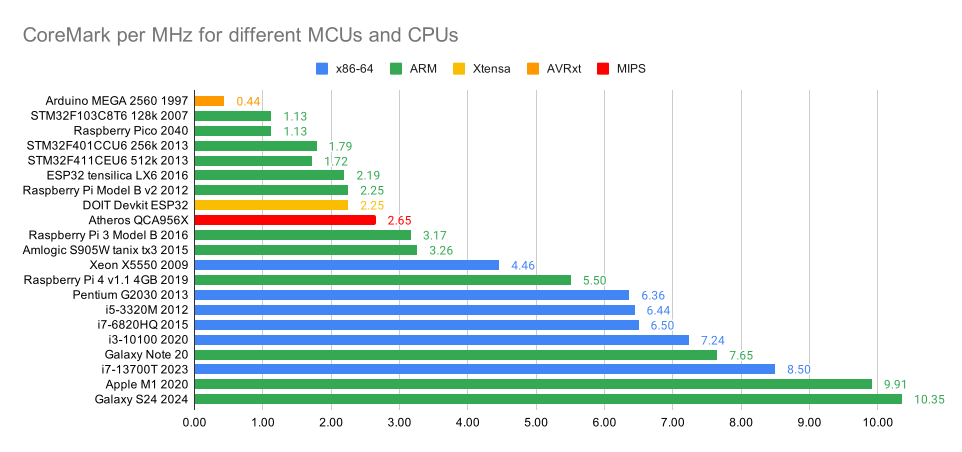
Note that only the Arduino is 8 bit, then followed by everything 32 bit until Qualcomm Atheros QCA956X, then continuing 64bin with the Raspberry Pi 3 with 3.17 Mark/MHz and a further big jump with out-of-order pipelines in the CPU for the Raspberry Pi 4 and 5.50 Mark/MHz.
Multithread results
| Board | CoreMark | MHz | Mark/Mhz |
|---|---|---|---|
| RPi3 Model B 4 threads | 15194 | 1200 | 3.16 |
| Amlogic S905W 4 threads | 15393 | 1200 | 3.21 |
| Raspberry 4 with 4 threads | 32880 | 1500 | 5.48 |
| i5-3320M 4 threads | 53450 | 3300 | 4.05 |
| i7-4960HQ 4 threads | 74944 | 3800 | 4.93 |
| i7-4960HQ 8 threads | 95261 | 3800 | 3.13 |
| i7-6820HQ 4 threads | 96420 | 3660 | 6.70 |
| i3-10100 4 threads | 103808 | 4070 | 6.38 |
| i7-6820HQ 8 threads | 118862 | 3660 | 4.13 |
| Xeon X5550 16 threads | 124634 | 3060 | 2.55 |
| i3-10100 8 threads | 167829 | 4070 | 4.95 |
| i7-13700T 16 threads | 319893 | 2650 | 7.54 |
| i7-13700T 24 threads | 390614 | 2550 | 6.38 |
Bluepill STM32F103C8T6 can only be programmed with the ST-Link V2 programmer.
Blackpill STM32F401CCU6 and STM32F411CEU6 working with:
- Correct board and board part number
- U(S)ART support: “Enabled (generic ‘Serial’)”
- USB support (if available): “CDC (generic ‘Serial’ supersede U(S)ART)” to have COM port serial after reboot
- Upload method: “STM32CubeProgrammer (DFU)”
Programming mode activated by press and hold Boot0 and hit NRST. You have a new USB devices “STM32 BOOTLOADER”.
Results in a Graph - CoreMark/MHz
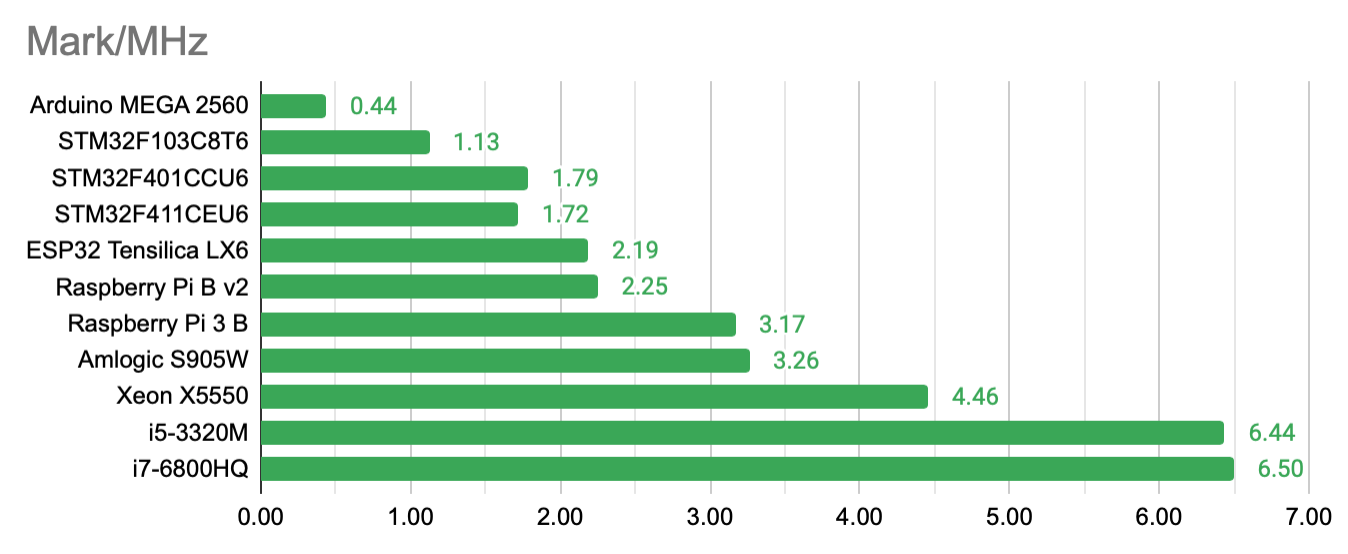
Most interesting is the ratio CoreMark/MHz:
Update 2024/08/09
The Raspberry Pico 2350 was just released. It has both a Cortex M33 dualcore and a Hazard3 dualcore. Their speed (for 150 MHz) should be 4.02 and 3.81 CoreMark/MHz, respectively.
An update for the M1 CoreMark is needed. And some test results for above processors. Scheduled as TBD in Saigon for September 2024.
Cross-compile for MIPS on TP-Link Archer C7
I installed the toolchain already for ath79. Now we need to tell the compiler where to find it:
export STAGING_DIR=~/github/openwrt-sdk-25.12.2-ath79-generic_gcc-14.3.0_musl.Linux-x86_64/staging_dir/
export PATH=$STAGING_DIR/toolchain-mips_24kc_gcc-14.3.0_musl/bin:$PATH
Then compile cleanly, and copy to your router:
make PORT_DIR=simple CC=mips-openwrt-linux-gcc XCFLAGS="-O2 -march=24kc -static" RUN=true
scp -O coremark.exe root@10.5.5.1:/tmp/coremark
Log into your router and start the benchmark:
root@OpenWrt:/tmp# ./coremark
2K performance run parameters for coremark.
CoreMark Size    : 666
Total ticks      : 14613617
Total time (secs): 14.613617
Iterations/Sec   : 2052.879859
Iterations       : 30000
Compiler version : GCC14.3.0
Compiler flags   : -O2 -DPERFORMANCE_RUN=1
Memory location  : STACK
seedcrc          : 0xe9f5
[0]crclist       : 0xe714
[0]crcmatrix     : 0x1fd7
[0]crcstate      : 0x8e3a
[0]crcfinal      : 0x5275
Correct operation validated. See README.md for run and reporting rules.
CoreMark 1.0 : 2052.879859 / GCC14.3.0 -O2 -DPERFORMANCE_RUN=1   / STACK
2052.88 CoreMark at 775 MHz equals 2.65 CoreMark/MHz